Go Live on Your Lock Screen with GameChanger for iOS

Youth Sports on Lock
There are moments every youth sports parent knows a little too well. The schedule was fine...until it wasn’t. And look, we’re adults. We can handle curveballs. But at some point, the workarounds stop feeling like solutions. It’s 2026. There’s got to be more.
Sound familiar? Let’s play the game of Life for a second. Give yourself a point for every game-changing moment that’s happened to you:
- A last-minute meeting hijacks your afternoon.
- A rainout pushes the game to your already-full weekend.
- A work trip puts you on a plane during the biggest game of their season.
- A sick kid sidelines you while your partner takes the other one to their game.
- You're at your daughter's recital when your son's team takes the field.
- Wedding season, graduation season, vacation season, and game-play season always overlap.
If you scored at all, you know what it costs. And somewhere in the middle of all of it, the clock kept running without you. It doesn’t have to anymore.
Life is full of activities. Now one of them lives on your lock screen.
Introducing Live Activities for iOS by GameChanger
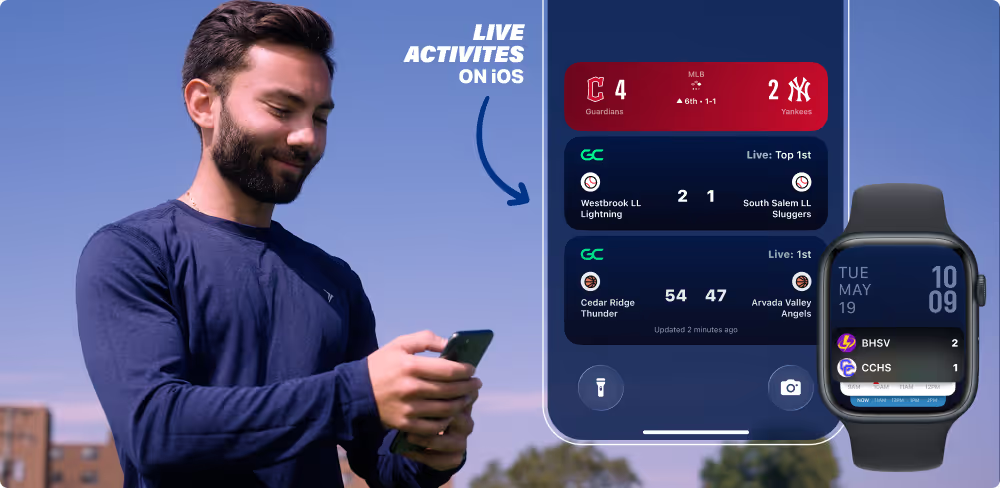
Live Activities in the GameChanger App puts live sports scores and game status for the teams you follow directly on your iPhone lock screen — updating continuously from the first play to the final buzzer. No unlocking your screen and no opening the app. Simply glance at your phone to know exactly where things stand in the game you’d otherwise miss.
It works across every sport scored on GameChanger, and it’s yours at no extra cost. Another win for everyone who has a reason to care about the game.
The Dynamic Island for iOS
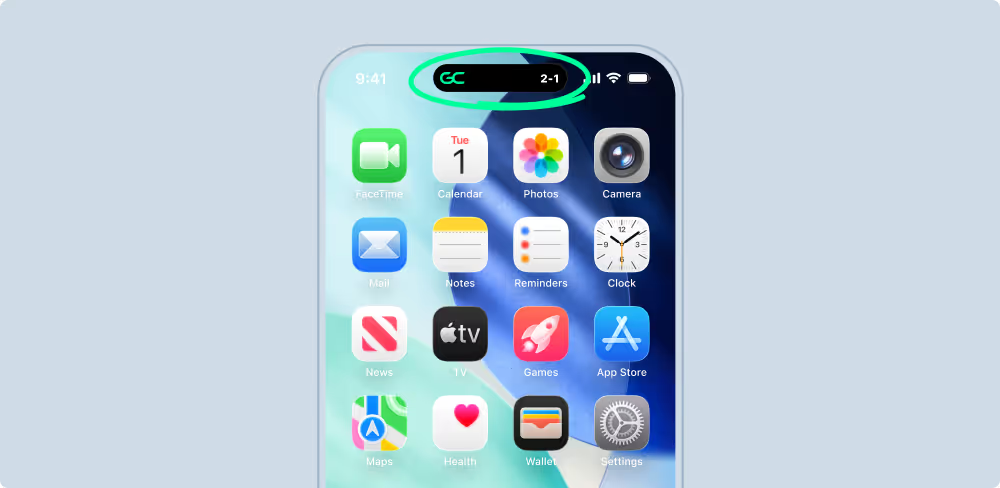
With all that life throws at us nowadays, it helps to have a reliable plan B. For iPhone 14 Pro and newer users, the Dynamic Island — the oval around the front facing camera in the middle of the top of the screen — takes live sports scores a step further.
You’ve been with your teen athlete all season, and it’s been a bit of a rollercoaster. The car rides home after practice come with the classic rotating mix of tears, breakthroughs, and the silence where you just let them process. You’re not on the roster, but you’re a part of the team.
Then a work trip comes out of nowhere the week of the game you’d both been building toward for weeks.
The disappointment is real. But so is your plan B.
GameChanger’s Dynamic Island keeps Live Activities at the top of your screen at all times. When the score changes, it expands quietly. So there's no fumbling to unlock or noticeable disruption, just you knowing what happened on your phone without doing a thing.
Yes, the trip took you away from the field, but it didn't take you out of the game.
Live Youth Sports Scores on Apple Watch
Let’s call this next life moment “Saturdays happen.” Imagine your youngest running circles around your lawn chair, the middle child playing on the field right in front of you, and your oldest playing across town.
You hand your phone to the youngest to watch her favorite cartoon while cheering like a mom living her best youth sports era on the sidelines. The game across town isn’t being missed — it’s on your wrist.
Live Activities on Apple Watch delivers real-time scores and game status — quietly, no reaching required. One look and you know exactly what's happening across town.
Follow Five Games at Once
Tournament weekends aren’t just about your kid’s game. They’re about every game.
Say your son is deep in the 12u baseball bracket and your daughter has an early first pitch on the opposite end of the complex in her softball bracket. You and your partner split up before the dew even burns off the grass. Somewhere across the complex, a divisional rival is playing a game that determines where your kid’s team lands in the afternoon — and you won’t be anywhere near that field today.
That’s three games worth caring about all before 9 a.m.
Live Activities lets you follow up to five live games at once — all on your lock screen, all updating in real time. You glance down and the whole bracket picture comes into focus.
Tournament weekend, handled.
Set It and Forget It
The best features are the ones you set up once and never think about again. Live Activities is one of those.
The first time a scored game starts for a team you follow, GameChanger will ask if you want to enable Live Activities. Allow it once and that's it. Your preference is saved, the updates find you, and you never have to think about it again. And when you’re ready for more than a glance, one tap takes you straight into the action.
When the final out is recorded or the buzzer sounds, it disappears from your lock screen on its own. No managing, no dismissing, no cluttered notifications. Just the game while it's happening and a clean screen when it's done.
You can update your preference anytime in Settings if you ever change your mind. Turns out the best plan is the one that runs itself.
Easy Access to Live Activities for iOS
Because life is full of activities, GameChanger ensures one of them lives on your lock screen. Getting set up takes less time than it does to find parking at the complex.
- Make sure your phone’s iOS is 17.2+
- Follow your favorite teams
- Live Activities handles the rest
That’s it. Your lock screen is ready for the next first pitch.
Everything you need to get started is right here.
Lorem ipsum dolor sit amet, consectetur adipiscing elit, sed do eiusmod tempor incididunt ut labore et dolore magna aliqua. Ut enim ad minim veniam, quis nostrud exercitation ullamco laboris nisi ut aliquip ex ea commodo consequat. Duis aute irure dolor in reprehenderit in voluptate velit esse cillum dolore eu fugiat nulla pariatur.
The Only App You Need This Season