GameChanger Live Stream Tips & Tricks

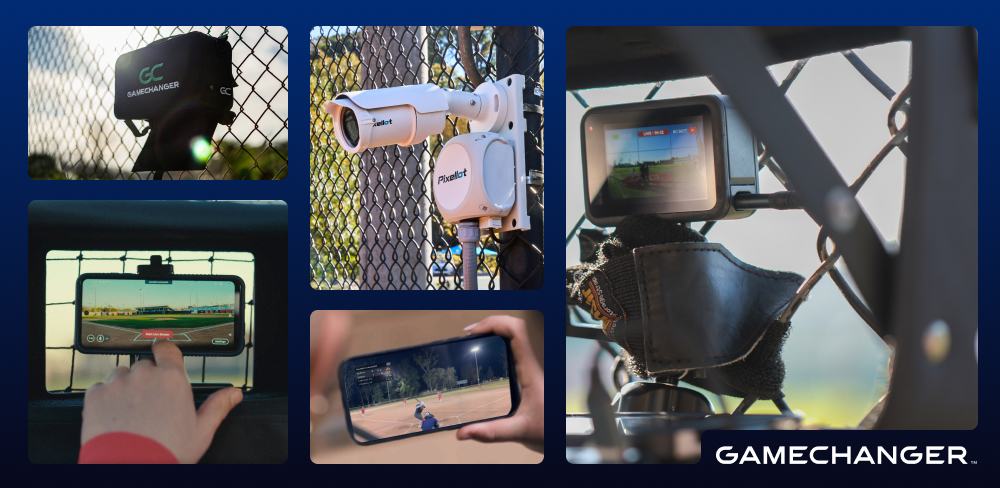
Supporting the Changing Landscape of Youth Sports Live Streaming
Youth sports have entered a new era — one where many fields look and feel surprisingly close to professional stadiums, and where families expect to watch their favorite athlete’s games in real time, not just from the stands but from anywhere in the world. And they can — when their team live streams on GameChanger.
From iPhone to Pro: Live Streaming on GameChanger
It’s easy to start live streaming on GameChanger — all you need is a mobile device! But what if you want to use an external camera or your tournament facility is using fixed cameras? Where do you begin? Whether you’re new to live streaming and simply looking for the best practices and quick tips to get started with a mobile device, or your team is ready to uplevel your live streams with more professional quality video, there are a variety of GameChanger-compatible camera options available. Here’s what you and your team can expect with the different live streaming solutions and our best tips to get started.
Want help finding the best camera solution for your team? Check out our camera recommendation quiz.
Mobile Live Stream
Live streaming games on a mobile device is an accessible, low-lift solution. A single parent or coach can secure their device to the backstop fence with a fence clip or GameChanger Streaming Kit to start capturing video and sharing it with family and friends across the country.
Great for: Parents or coaches who want a quick, no-fuss option to live stream baseball or softball games using a device they already own.
Mobile Live Streaming Tips & Tricks
Here are a few best practices to consider when you live stream games with a mobile device:
- Mute notifications on the device so the live stream doesn’t get interrupted.
- Mount the device on a sturdy base to keep the device secure and to provide the best viewing experience for family and fans.
- Ensure the device is fully charged on game day, or use an external power supply (our recommended option!) so the stream doesn’t get cut short if the device runs out of battery.
Mevo Live stream
Live streaming games from a Mevo external camera (or cameras!) is an easy and intuitive solution for teams who are interested in getting higher-quality video or capturing the game from multiple angles. The Logitech Mevo Multicam app allows users to link multiple cameras to capture the on-field action from various angles, creating a polished, broadcast-style stream for family and fans to enjoy.
Great for: Parents or coaches who want a streamlined, multi-angle video experience.
Mevo Live Streaming Tips & Tricks
Here are a few best practices to consider when you live stream games with a Mevo camera:
- Protect the camera from extreme heat and inclement weather to maintain both the quality of the stream and the longevity of the device. (The GameChanger Streaming Kit offers ideal protection.)
- Take time before your event to download the Mevo Camera app (and Mevo Multicam app if using more than one camera) to practice connecting your camera/s to GameChanger for easier game day setup.
- Ensure the device is fully charged on game day, or consider using an external power supply so the live stream doesn’t get cut short if your device runs out of battery.
GoPro Live Stream
Live streaming games from a GoPro camera delivers sharper, wide-angle footage with a quick setup. Thanks to the enhanced GameChanger + GoPro integration, you can go live in just a few taps. Plus, GoPros are durable, versatile cameras built to handle whatever your day holds. GameChanger-compatible GoPro models include the GoPro Hero 7 Black, 8, 9, 10, 11 Black, 12, 13, and the GoPro Max.
Great for: Parents or coaches who want an all-purpose camera option.
GoPro Live Streaming Tips & Tricks
Here are a few best practices to consider when you live stream games with a GoPro camera:
- Bring extra GoPro rechargeable batteries (already charged!) so you can swap them out if needed or utilize an external power source.
- Download the GoPro Quik app and practice connecting your camera to GameChanger ahead of your event for a more seamless setup when game day rolls around.
Elite Fixed Camera Live Stream
For facilities and fields with dedicated IT infrastructure to support streaming, a wired single- or two-camera system is a scalable solution that provides consistent coverage for every game. To enjoy hands-free, high-quality game coverage, visiting teams can scan the QR code at the field to connect the camera/s to their team’s GameChanger App.
Great for: Competitive programs with IT/AV resources looking for a permanent streaming solution behind home plate.
Elite Fixed Camera Live Streaming Tips & Tricks
Here are a few best practices to consider when you live stream games with a facility’s single- or two-camera system:
- Confirm the camera you connect with is assigned to the correct field before the game begins so you don’t accidentally start streaming a different game from a different field.
- If the field has multiple cameras, preview all angles before the first pitch. We typically recommend the home plate or main broadcast angle for smoother playback and consistency.
Pixellot Live Stream
Live streaming games from a facility’s Pixellot fixed camera offers pro-level game coverage made simple. All your team needs to do is connect the camera to your team’s GameChanger App by scanning the facility’s QR code. From there, family and fans can enjoy hands-free streaming and high-quality footage.
Great for: Rec teams and programs looking for a live stream with a true broadcast feel.
Pixellot Live Streaming Tips & Tricks
Here are a few best practices to consider when you live stream games with a Pixellot camera:
- Confirm the camera you connect with is assigned to the correct field before the game begins, so you don’t accidentally start streaming a different game from a different field.
- Sit near home plate and double-check your device’s network strength if you are planning to score the game. This will help the score stay in sync with the video and keep the live scoreboard overlay up to date.
Capturing Valuable Footage for Game Day and Beyond
Together, we’re building a future where every athlete, at every game, gets the spotlight they deserve — no matter the camera.
From the smartphone in your back pocket to more pro-level setups, GameChanger is meeting teams exactly where they are to provide family and fans with a can’t-miss game day experience when they live stream.
Find the best camera solution for your team’s live streaming goals using our Camera Recommendation Tool.
Lorem ipsum dolor sit amet, consectetur adipiscing elit, sed do eiusmod tempor incididunt ut labore et dolore magna aliqua. Ut enim ad minim veniam, quis nostrud exercitation ullamco laboris nisi ut aliquip ex ea commodo consequat. Duis aute irure dolor in reprehenderit in voluptate velit esse cillum dolore eu fugiat nulla pariatur.
The Only App You Need This Season